
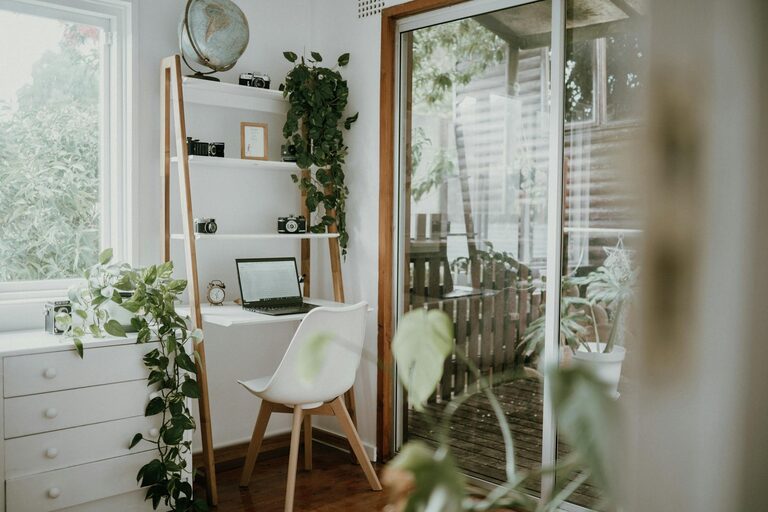
Creating a relaxing home workspace is essential for maintaining focus and reducing stress during your workday. Whether you work remotely full-time or occasionally need a quiet place to concentrate, your environment plays a big role in how productive and comfortable you feel. Here’s a guide to help you design a calming, functional, and inviting workspace right at home.
Why a Relaxing Workspace Matters
Spending hours working in a cluttered, noisy, or uncomfortable area can lead to distractions and burnout. A well-thought-out workspace that fosters relaxation can improve your mood, increase focus, and even enhance creativity. When your office space feels peaceful, you’re more likely to enjoy your work and maintain a good work-life balance.
Choosing the Right Location
The first step in creating a relaxing workspace is selecting an ideal spot in your home.
– Natural Light: Try to set up near a window to enjoy natural light, which can boost energy and reduce eye strain.
– Minimal Foot Traffic: Pick a quiet corner where you won’t be disturbed by other household members.
– Space and Size: Consider the amount of desk space you need and ensure the area allows for comfortable seating and movement.
Declutter and Organize
A clutter-free desk and environment can significantly reduce stress and distractions.
– Keep Only Essentials: Limit items on your desk to what you need daily—your computer, notebook, pen, and perhaps a small plant.
– Use Storage Solutions: Use shelves, drawers, or organizers to keep paperwork and supplies neatly tucked away.
– Regular Tidying: Make it a habit to clean and organize your workspace at the end of each day.
Ergonomic Furniture and Layout
Comfort is key to staying relaxed and focused.
– Supportive Chair: Invest in a good office chair with adjustable height and lumbar support.
– Desk Height: Your desk should allow your arms to rest comfortably while typing, with wrists straight.
– Monitor Position: Position your screen at eye level to avoid neck strain.
– Footrest: If your feet don’t rest flat on the floor, use a footrest to maintain proper posture.
Incorporate Calming Elements
Adding relaxing touches can make your workspace feel inviting and peaceful.
– Plants: Indoor plants improve air quality and add a soothing natural element.
– Colors: Choose calming colors like soft blues, greens, or neutrals for walls or decor.
– Lighting: Use soft, warm light instead of harsh fluorescent bulbs; consider a desk lamp for focused lighting.
– Aromatherapy: Use subtle scents like lavender or eucalyptus through diffusers or candles to create a tranquil atmosphere.
Personalize without Overcrowding
Personal touches can boost your mood, but avoid clutter.
– Photos or Art: Display meaningful photos or inspirational artwork.
– Motivational Quotes: A small quote or affirmation can provide encouragement.
– Simple Decorations: Items like a favorite mug or a minimalist clock add personality without distraction.
Manage Noise and Distractions
Controlling sound and interruptions helps maintain concentration.
– Noise Cancelling Headphones: These can block out household noise or help focus while listening to calming music.
– White Noise Machine: A white noise machine or app can mask background sounds.
– Set Boundaries: Communicate your work hours to family or housemates to minimize disruptions.
Take Breaks and Move
Remember that a relaxing workspace also supports healthy habits.
– Stretching: Incorporate regular stretches to avoid stiffness.
– Break Area: If possible, have a separate spot for breaks to mentally separate work and rest.
– Natural Views: If you have a window, occasionally look outside at nature to reduce eye fatigue.
Technology Tips
Harness technology to keep your workspace efficient and calming.
– Cable Management: Use clips or sleeves to organize cords and reduce visual clutter.
– Screen Breaks: Use apps to remind you to rest your eyes periodically.
– Minimal Notifications: Turn off non-essential alerts to stay focused.
Final Thoughts
Creating a relaxing home workspace doesn’t mean sacrificing functionality. By choosing a peaceful location, organizing thoughtfully, and adding calming touches, you can create an environment that supports your well-being and productivity. Experiment with what works best for you and enjoy the balance of comfort and efficiency in your workday.